

Production guide
Inside Flash-7: oscillator character, moving patches and a complete effects chain
Watch the full Flash-7 overview and learn how its eight oscillator types, coloured filters, modulation, effects and arpeggiator shape your own synth patches.
Watch the video
Watch on YouTube (opens in a new tab)Video by Black Marvin Published
Recorded on November 21, 2026. Offers and bonus eligibility mentioned in the video reflect that recording; check the product page for current purchase options.
Start with the musical role of the patch
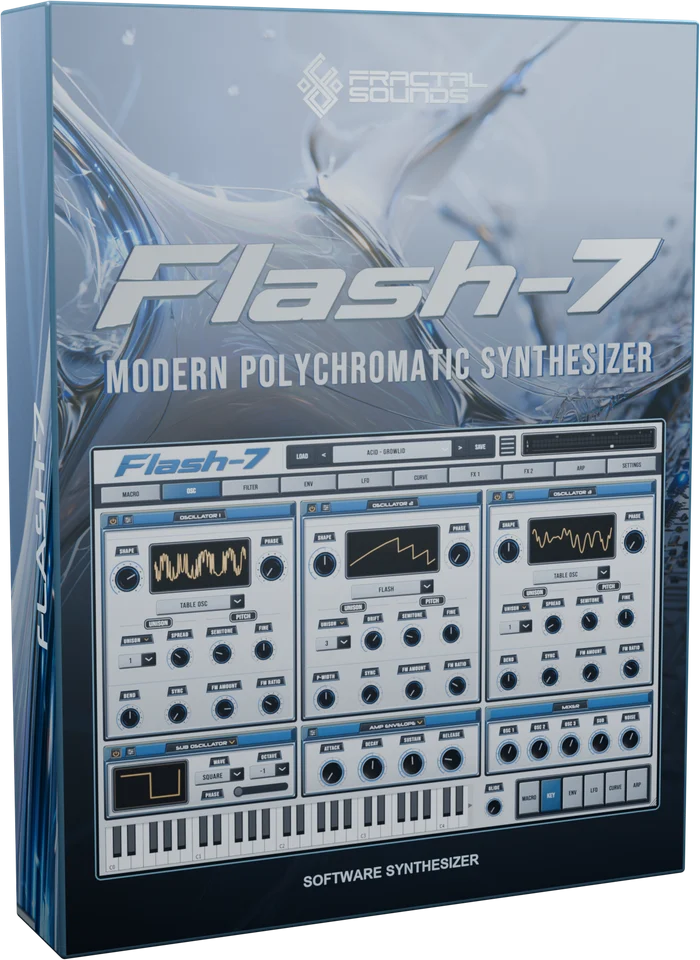
Flash-7 is a synthesizer instrument with three independent oscillators, eight oscillator types, three flexible filters and an effects chain you can rearrange. In this complete overview, Black Marvin explains its polychromatic idea through sound: different engines, filter colours and saturation stages offer several tonal identities inside one instrument.
The opening auditions move through zaps, sequences, Psy FM leads and more melodic material. Black Marvin's psytrance background is audible, but the instrument also supports trance, psytech and synthwave approaches. Begin with the role you need, such as a precise bass, a short stab, an animated sequence or a sustained texture. That decision makes the engine and modulation choices easier to hear.
Choose the oscillator before building a large patch
At 6:17, the walkthrough moves into the oscillator families. Flash offers familiar waveforms with shaping, sync and FM options. Oracle provides another analog-inspired starting point. Boreal introduces a West Coast wavefolding approach with Fold, Warp, Symmetry and FM. B14CK takes inspiration from tube coupling, turning relatively simple waveforms into more complex, assertive tones.
Try these choices with one oscillator and restrained processing first. A short envelope makes it easier to compare their attack and body for a stab; a sustained note reveals how a slow modulation changes the waveform. The point is to hear which engine supplies useful character before adding layers that hide the difference. Analog and tube references describe inspiration, not a promise to reproduce a particular hardware circuit exactly.
Use a wavetable as material, not as a finished preset
Table OSC appears at 10:36. Its browser supports exploring a wavetable collection and importing your own material, while Bend, Sync and FM provide further changes inside the patch. Shifter, demonstrated at 14:14, offers a different route through wavetable material using formant, formant-spread and harmonic-shift controls. Compare the same source with a simple envelope before deciding which route fits the part.
The video also shows the Fractal Sounds library workflow and Angulum examples. Library access does not mean every commercial wavetable pack is included with Flash-7. Owned packs and separately eligible bonuses are distinct from the synth's factory content. Check the collection you actually have access to, then build a patch around its waveform movement.
Build density with Swarm, Orbit and unison
At 15:01, Swarm explores stacked saw density and tuning, with its own sub mix. Orbit follows at 15:43, arranging cells through Cloud, Lattice and Harmonics approaches. These engines are useful starting points when the relationship between several pitches or voices is central to the sound, rather than an effect added at the end.
Earlier in the walkthrough, Velvet and Drifty provide contrasting unison behaviours. Black Marvin describes Drifty as a rougher, less orderly option. Compare it with Velvet on the same phrase instead of assuming that more drift or more voices will always sound larger in context. At 17:01, oscillator retriggering becomes another practical choice for bass patches where repeatable note starts matter.
Separate filter shape, circuit colour and routing
The filter section begins around 17:06. Cutoff and resonance shape the spectrum, while Drive and the different colours change how the filter responds. The MX examples lean into resonant acid character; other colours offer a different response to the same source. Hear those differences with a short repeating phrase and compensate for level changes when comparing.
At 20:14, the routing choices introduce serial, parallel and stereo approaches. A filter fed by another filter receives an already changed signal; a parallel path offers a different balance of treatments. By 21:09, Black Marvin connects this to a wider idea: several restrained saturation stages can build character progressively. Keep each stage intentional and revisit the output level as the patch becomes denser.
Shape a pluck, then make the modulation expressive
At 21:34, the envelopes move between ADSR and drawn shapes. Duration and curve tension become useful ways to change the feel of a pluck without replacing its oscillator. The modulation tiles support drag-and-drop assignments, and the detailed assignment controls let you refine the amount and response of a connection.
The overview demonstrates an envelope assigned to pitch, assignment-curve adjustments and a macro controlling whether a modulation link is active. These are different jobs: the source supplies movement, the depth sets its range, and the response curve determines how that movement reaches the destination. Establish one clear connection before adding a second. Flash-7's six macros can then turn selected variations into controls you can perform.
Keep rhythmic movement deliberate with LFO Timing and Curve
The LFO section at 24:33 compares time in Hertz with tempo-related divisions. At 25:31, Timing mapping makes a modulated rate follow tempo-related steps instead of simply sweeping through intermediate values. This is useful when you want a changing rhythmic density while preserving a relationship with the track's tempo.
Curve follows at 26:07 with drawing, grid and snapping controls. A stepped random pattern assigned to the filter demonstrates how one held note can gain a changing contour. Start with a modest modulation amount so you can hear the pattern itself, then adjust the range. Envelope shaping, continuous LFO movement and stepped curves serve different musical purposes even when they target the same cutoff.
Use effects order as part of synthesis
At 27:42, FX1 and FX2 expose the chain across two pages, with effects that can be rearranged. Saturation moves from warmer colours toward stronger warping and shaping. Tone provides a frequency tilt, while the following examples explore phaser, chorus and the alternative Intermod or Interfilter processors in a shared slot.
Intermod includes ring modulation, frequency shifting and bit crushing. Interfilter offers treatments such as comb and vowel filtering. Choose the job you need from that slot rather than expecting both alternatives to run there simultaneously. Try changing the chain order with a familiar phrase: processing a clean note before a spatial effect can behave differently from processing the resulting repeats or tail.
Control the tail as carefully as the attack
At 31:41, the delay offers synced, free and reverse approaches, with cuts and Blur for shaping the repeats. Reverb follows with Classic, Silk and Spring characters. Black Marvin contrasts their response rather than presenting one as the correct choice for every sound. A short sequence can become crowded quickly, so audition the tail against the next notes of the actual phrase.
The compressor section at 33:16 introduces three modes, a Squeeze control that changes the compression behaviour and Color for additional saturation. Circuitry and EQ provide further tonal adjustments. The later character settings are subtler: Glass and Warm are demonstrated as final colour choices whose effect depends on the source. They are finishing decisions, not substitutes for choosing a useful oscillator and envelope.
Let the arpeggiator generate notes, movement or both
The arpeggiator begins at 34:51 with a direct pattern-building workflow, selected-lane randomization and a scale example. Gate, Shuffle and Clock adjust how the pattern feels. At 37:45, Black Marvin distinguishes the combined arpeggiator and modulation behaviour from modulation-only use, which lets a pattern animate a sound while you retain control of the notes.
The arp's note information can also act as a modulation source. The overview compares a continuous response with Notes mapping for discrete pitch-related steps. Randomize a selected lane, listen with your intended harmony, and keep the parts of the result that serve the track. Generating a useful variation does not require replacing the entire pattern.
Try the workflow on your own computer
Flash-7 provides 100 factory presets, with 100 additional presets unlockable through the free Fractal Path. Playing earns Fragments for that bonus content; synthesis features are available from the start. Use an existing patch to hear the instrument quickly, then build a simple patch to test the controls covered in the overview.
The 21-day trial starts when you choose Start 21-day trial inside Flash-7. The trial page lists current installers and requirements for macOS and Windows. Test the plugin in your own host and session, including saving and reopening a patch. The separate FAQ covers formats, activation, factory content, engine choices and the practical differences between the controls demonstrated here.
Bring Flash-7 into your session.
Find current product details, compatibility and listening examples.